Bring your business to thousands of buyers
Open a digital storefront, manage products and orders — all in seller mode.
Your store’s health at a glance
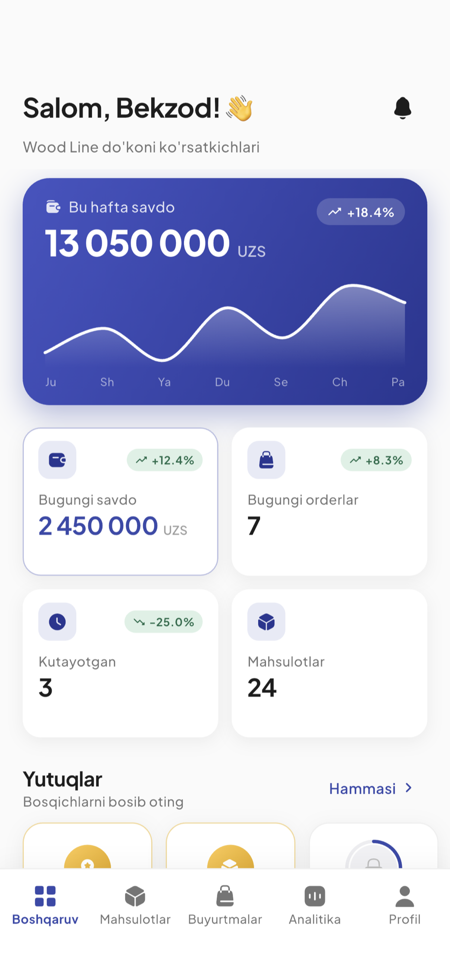
Revenue, order dynamics, rating and the latest orders — the seller panel shows it all live.
A sample view of the seller dashboard: weekly revenue growth, a daily orders chart, the store rating and a list of recent orders.
A full toolkit to run your sales
Order management
From a new order to delivery — every stage in one panel, managed with a tap.
- 01
Accept
- 02
Prepare
- 03
Ship
- 04
Deliver
Digital storefront
Logo, cover and a full vitrine — with your brand.
Product management
Attributes, colors, variants, photos and stock control.
Sales analytics
Revenue, orders, reviews and best sellers.
Chat with customers
Direct conversation per order.
Tariff plans
Free to Enterprise — scale to your business.
KYC verification
Document-based verification and a “Verified” badge.
AI photo enhancement
AI polishes your product photos — for a storefront that sells.
Becoming a seller — in the app
Sign-up, verification and opening a store all happen in the Woody app. Download the app and switch to seller mode.
Start selling on Woody
Download the app, switch to seller mode and open your store.